|
E-Mail Forwarding And E-Mail Software Setup E-Mail Forwarding allows you to redirect mail sent to your domain to another e-mail address. For example, perhaps you would like all mail sent to info@yourdomain.com to be sent to erichv@aol.com. You would add a redirect much like the picture below is set up. 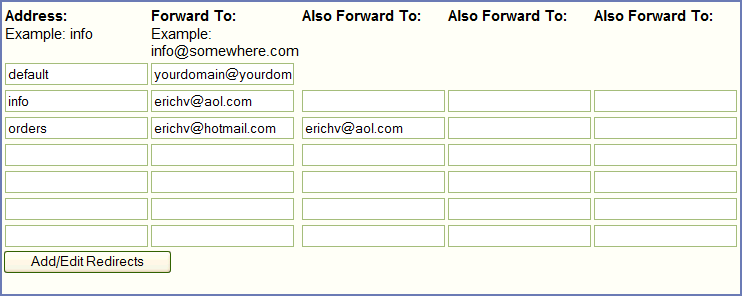 Follow These Steps For E-Mail Forwarding
Follow These Steps To Receive All E-mail From Your DomainIf you would like all the e-mail that comes into your website with your new or existing domain to come into software setup on your computer, please follow the instructions below.
 More Detailed E-mail InformationHow you setup your email is going to depend on what email program you are using. You can either setup your email program to check your email at your domain, or you can use your current email address of your-email@your-provider.com, and simply forward all email from your hosting account to that email address.To just forward everything, go to your control panel here: http://yourdomain.com/cgi-bin/plusmail login, then click on "email forwarding" Then, under the default line (do not edit the default line) in the farthest empty box to the left, put: "yourdomain" (no "" marks) then in the next blank to the right of that blank, put: "your-email@your-provider.com" (again, no "" marks) then click the button at the bottom of the page that saves the changes. Then, any email sent to your domain name (anything@yourdomain.com) will go to your your-email@your-provider.com account. Adding a Separate MailboxIf you want to have a separate mailbox that has its own login and password:Login to your control panel and click on "User Manager" from the menu on the left. Then, click on "Add User" at the top of that page. Then, in the "Username" blank, put the front of the email address. For example, if you want example@yourdomain.com for the email address, you'd put "example" in the "Username" blank. (again, no "" marks) After that, leave the "Type" set at "POP" and put in whatever password you want that email account to use in the "Password" blank. Leave the "Directory" blank empty, and click the "Setup" button. Wait fifteen minutes or so, and then the account should be setup. E-Mail ProgramsTo setup your email program to send and receive email through your hosting account, please see the manual located here: http://supportmanual.com and click on "full manual" on the menu to your left, and then see the section labeled "Email management" (bottom left hand side of the first box of links)Web Based E-Mail Programs:To use SquirrelMail (a web based email program like hotmail and yahoo):Simply go to: http://your-domain-here.com/webmail |